Category: Uncategorized

  • Say Goodbye to Manual File Sharing with Smart Presentation Scanners

    In today’s fast-paced digital workplaces and classrooms, manual file sharing is quickly becoming outdated. Passing around printed documents, emailing large attachments, or transferring files via USB drives not only wastes time but also increases the risk of errors and data loss. Fortunately, smart presentation scanners are transforming how organizations capture, share, and present information.

    If you’re looking to streamline document workflows, improve collaboration, and eliminate inefficient manual processes, it’s time to explore how presentation scanners can revolutionize your operations.

    What Are Smart Presentation Scanners?

    Smart presentation scanners are advanced document capture devices designed to scan, display, and instantly share documents, images, and objects in real time. Unlike traditional flatbed scanners, these devices often feature flexible arms, high-resolution cameras, built-in software tools, and direct connectivity to computers, interactive displays, and cloud platforms.


    Modern devices such as the AVerVision M17-13M and the Epson DC-13 are widely used in classrooms, boardrooms, and training centers for seamless document sharing and live presentations.

    These smart solutions eliminate the need for repeated printing, manual emailing, or physically distributing materials—making file sharing faster and more efficient than ever before.

    The Problem with Manual File Sharing

    Before understanding the benefits, let’s look at the common issues with traditional file-sharing methods:

    • Time-consuming scanning and emailing
    • Lost USB drives or corrupted files
    • Version control confusion
    • Delayed collaboration
    • Security risks from uncontrolled file transfers

    Manual file handling slows productivity and creates unnecessary friction in communication. In environments where speed and accuracy matter—such as education, corporate training, retail operations, and healthcare—these inefficiencies can impact overall performance.

    How Smart Presentation Scanners Solve These Challenges

    1. Instant Digital Capture and Sharing
      With a smart presentation scanner, documents are captured in real time and instantly displayed on large screens, projectors, or shared via video conferencing platforms. This eliminates repetitive scanning and uploading steps.
      For example, when connected to tools like Microsoft Teams or Zoom, documents can be streamed live during meetings or classes, ensuring everyone sees the same content simultaneously.
    2. Seamless Integration with Modern Workspaces
      Smart scanners integrate easily with:
      > Interactive flat panels
      > Projectors
      > Learning management systems
      > Cloud storage platforms
      > Hybrid meeting setups
      This makes them ideal for hybrid work environments and smart classrooms. Instead of manually transferring files, users can scan and upload directly to shared drives or cloud storage in seconds.
    3. Improved Collaboration and Engagement
      In classrooms, teachers can display textbooks, handwritten notes, or 3D objects in real time without preparing digital copies in advance. This makes lessons more interactive and engaging.
      In business settings, teams can quickly present contracts, charts, prototypes, or physical documents during discussions. No waiting. No email chains. No confusion.
      By reducing technical interruptions, smart presentation scanners keep meetings productive and focused.
    4. High-Resolution Clarity
      Modern presentation scanners offer Full HD or even 4K resolution imaging, ensuring that text, diagrams, and small details are clearly visible—even on large displays.
      This is especially valuable in:
      > Engineering and design presentations
      > Medical training
      > Legal documentation reviews
      > Retail product demonstrations
      High-quality visuals eliminate misunderstandings caused by poor image clarity.
    5. Built-In Annotation and Recording Features
      Many smart presentation scanners include:
      > On-screen annotation tools
      > Snapshot capture
      > One-touch recording
      > Image enhancement features
      Presenters can highlight key points, draw over documents, and record sessions for later review—without additional software.
      This feature is particularly useful in training programs, remote education, and product demonstrations where sessions need to be archived.
    6. Reduced Paper Usage and Environmental Impact
      Switching from manual paper-based sharing to digital presentation scanning reduces:
      > Paper consumption
      > Printing costs
      > Physical storage needs
      > Waste
      Organizations looking to improve sustainability efforts can significantly reduce their carbon footprint by adopting digital document workflows.

    Use Cases Across Industries

    Education Sector

    Smart presentation scanners are ideal for:

    • Hybrid learning environments
    • Interactive classroom teaching
    • Recording lectures
    • Live demonstrations

    Teachers can quickly scan assignments, showcase student work, or explain complex diagrams in real time.

    Corporate Offices

    In business environments, these scanners improve:

    • Team collaboration
    • Document review meetings
    • Client presentations
    • Training sessions

    They eliminate delays caused by manual file transfers and enhance professional communication.

    Retail and Customer Experience Centers

    Retail businesses can use presentation scanners to:

    • Showcase product catalogs
    • Demonstrate physical product features
    • Digitize paperwork instantly
    • Improve in-store customer engagement

    This creates a smoother, more interactive buying experience.

    Key Features to Look For in a Smart Presentation Scanner

    When choosing a presentation scanner, consider:

    • High-resolution camera (Full HD or higher)
    • Flexible adjustable arm
    • USB and HDMI connectivity
    • Cloud integration support
    • Annotation and recording tools
    • Compact, foldable design
    • Compatibility with video conferencing platforms


    Selecting the right device ensures you maximize efficiency and long-term value.

    The Future of Digital File Sharing

    As workplaces and educational institutions continue shifting toward digital-first environments, smart presentation scanners are becoming essential tools rather than optional accessories.
    They bridge the gap between physical documents and digital collaboration—making file sharing instantaneous, secure, and hassle-free.

    Manual processes are prone to delays, errors, and inefficiencies. Smart scanning technology eliminates these issues while enhancing engagement, productivity, and workflow automation.

    Conclusion: Upgrade from Manual to Smart

    If your organization still relies on USB drives, printed copies, or repetitive email attachments, it’s time to upgrade. Smart presentation scanners provide a faster, cleaner, and more professional way to capture and share information.

    By investing in modern presentation technology, businesses and educational institutions can:

    • Save time
    • Improve collaboration
    • Enhance presentation quality
    • Reduce operational costs
    • Support hybrid and remote environments

    Say goodbye to manual file sharing—and embrace smarter, faster, and more connected document management solutions.
  • Single Plane & Multi-Plane Presentation Scanners for High-Volume Retail

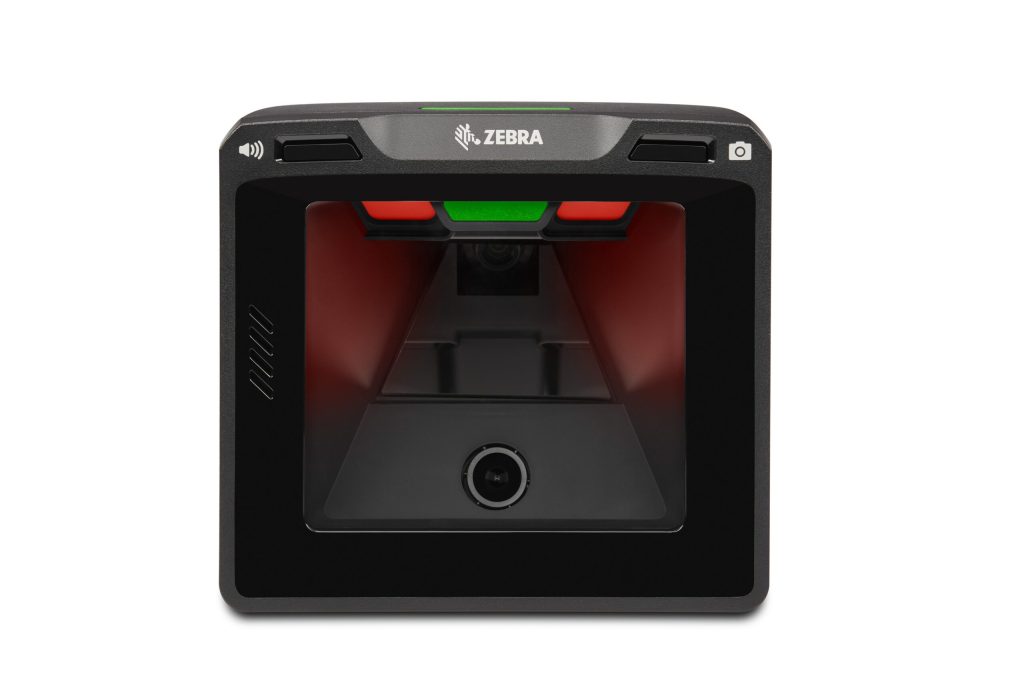
    In today’s fast-paced retail environment, checkout speed and accuracy play a major role in customer satisfaction. High-volume retail stores such as supermarkets, convenience stores, and large format outlets rely on advanced barcode scanning solutions to keep queues moving. Single plane and multi-plane presentation scanners are specifically designed to meet these demands, offering hands-free scanning and reliable performance at busy checkout counters.

    This guide explains what these scanners are, how they work, and which retail environments benefit most from each type.

    What Are Presentation Scanners?

    Presentation scanners are fixed barcode scanners that sit on the checkout counter. Instead of aiming the scanner at a product, the cashier simply passes the item in front of the scanning window. These scanners are widely used in high-traffic retail locations because they reduce manual effort and improve scanning speed.

    Presentation scanners generally fall into two categories: single plane and multi-plane.

    Single Plane Presentation Scanners Explained

    Single plane presentation scanners use one scanning line or one scanning direction. They require the barcode to be aligned in a specific orientation to be read correctly.

    Key Features of Single Plane Scanners

    Compact and cost-effective design

    Reliable performance for standard 1D barcodes

    Lower power consumption

    Easy to install and maintain

    Best Use Cases

    Single plane scanners are ideal for small to mid-sized retail stores, specialty shops, and counters with moderate transaction volumes. They work well when products are consistently oriented, such as boxed items or labeled packages.

    Multi-Plane Presentation Scanners Explained

    Multi-plane presentation scanners use multiple scanning lines from different angles. This allows barcodes to be read regardless of orientation, making scanning faster and more efficient.

    Key Features of Multi-Plane Scanners

    • Multiple laser or imaging planes for omnidirectional scanning
    • Faster barcode capture with minimal alignment
    • High accuracy for both 1D and 2D barcodes
    • Designed for continuous, high-speed operation

    Best Use Cases

    Multi-plane scanners are best suited for high-volume retail environments such as supermarkets, hypermarkets, and busy convenience stores. They significantly reduce checkout time by enabling quick, hands-free scanning of items in any position.

    Single Plane vs Multi-Plane: Key Differences

    The main difference lies in scanning flexibility and speed. Single plane scanners require precise barcode positioning, while multi-plane scanners capture barcodes from multiple angles. This makes multi-plane scanners more efficient for large baskets and peak-hour operations, whereas single plane scanners offer a practical solution for stores with lighter traffic.

    Why High-Volume Retailers Prefer Presentation Scanners

    High-volume retailers choose presentation scanners because they:

    • Speed up checkout and reduce customer wait times
    • Improve cashier productivity and comfort
    • Minimize scanning errors
    • Support consistent performance during peak hours

    Both single plane and multi-plane presentation scanners contribute to smoother operations when matched to the right retail environment.

    Choosing the Right Scanner for Your Store

    When selecting between single plane and multi-plane presentation scanners, retailers should consider:

    • Daily transaction volume
    • Types of barcodes used (1D or 2D)
    • Counter space and layout
    • Budget and long-term operational needs

    Making the right choice ensures efficient checkouts and a better shopping experience for customers.

    Conclusion

    Single plane and multi-plane presentation scanners play a vital role in high-volume retail operations. While single plane scanners are well-suited for smaller stores with moderate traffic, multi-plane scanners excel in fast-paced retail environments where speed and flexibility are essential. Understanding these differences helps retailers invest in the right technology to meet their checkout demands and future growth.

    Looking for reliable single plane or multi-plane presentation scanners for high-volume retail environments? Contact us today to find the right scanning solution that delivers faster checkouts, improved accuracy, and seamless POS performance.

  • From Retail to Healthcare: How Floor-Mount Kiosks Transform Operations

    Floor Monut Kiosk

    In today’s fast-paced, digitally driven world, floor-mount kiosks have emerged as essential tools for enhancing customer engagement, streamlining workflows, and improving service delivery across industries. Whether placed in busy retail stores, hospital lobbies, corporate offices, or government facilities, these kiosks offer a powerful combination of durability, accessibility, and smart functionality. Their ability to automate processes while maintaining a compact footprint makes them a preferred choice for modern organisations.

    This blog explores how floor-mount kiosks are transforming operations across sectors—especially retail and healthcare—while highlighting the key features that make them indispensable.

    What Are Floor-Mount Kiosks?

    Floor-mount kiosks are freestanding digital terminals designed to provide interactive services, display information, and facilitate transactions. They are typically equipped with touchscreens, secure enclosures, and optional peripherals such as barcode scanners, cameras, thermal printers, or RFID readers.

    Their sturdy design allows them to withstand high-traffic environments while remaining easy to install and relocate. This makes them ideal for organisations seeking digital transformation without major structural changes.

    Why Floor-Mount Kiosks Are Becoming Industry Essentials

    • 1. Enhanced Customer Experience

    Floor-mount kiosks offer fast, intuitive, self-service options that reduce waiting time and improve satisfaction. Users can browse information, complete transactions, or check in for services with minimal assistance.

    • 2. Improved Operational Efficiency

    By automating routine tasks—such as ticketing, billing, product lookup, or registration—businesses can free up staff to focus on high-value activities.

    • 3. Increased Accuracy & Data Collection

    Kiosks ensure consistent, error-free data entry while providing organisations with valuable insights into customer behaviour and service demand.

    • 4. Cost Savings

    Reduced staffing needs, faster transactions, and lower manual errors contribute to long-term operational savings.

    How Floor-Mount Kiosks Are Transforming Retail

    Retail businesses are among the earliest adopters of floor-mount kiosks, using them to deliver more personalised and efficient shopping experiences.

    1. Self-Service Product Lookup

    Customers can find product details, compare features, or check stock availability instantly—reducing dependency on staff.

    2. Faster Checkout and Payments

    Self-checkout kiosks help reduce queues, especially during peak hours, while supporting multiple payment methods.

    3. Digital Signage & Promotions

    Kiosks can display promotions, loyalty program information, or personalised recommendations, boosting sales and engagement.

    4. Click-and-Collect Assistance

    Shoppers picking up online orders can scan their QR code at the kiosk to confirm pickup and reduce wait times.

    5. Returns & Exchanges

    Automated return kiosks streamline the process, ensuring quick and smooth transactions.

    Overall, floor-mount kiosks help retailers create a seamless, omnichannel customer journey that increases convenience and drives repeat business.

    How Floor-Mount Kiosks Are Transforming Healthcare

    Healthcare facilities are rapidly adopting kiosks to modernise patient experiences and strengthen operational workflows.

    1. Smart Patient Check-In

    Patients can register, scan ID cards, update personal information, or confirm appointments through a user-friendly kiosk interface.

    2. Queue Management Systems

    Kiosks generate digital tokens and provide real-time queue updates, reducing crowding and improving service efficiency.

    3. Digital Health Records Access

    Visitors can retrieve lab reports, prescriptions, or follow-up instructions with secure authentication.

    4. Bill Payments and Insurance Verification

    Kiosks simplify financial transactions and reduce manual paperwork by supporting quick payments and insurance validation.

    5. Navigation & Wayfinding

    Interactive maps help patients and visitors easily locate departments, saving time and improving overall facility flow.

    In healthcare, floor-mount kiosks contribute to accuracy, privacy, and faster service—critical factors for patient satisfaction and clinical efficiency.

    Other Industries Benefiting from Floor-Mount Kiosks

    Hospitality

    • Touchless check-in/check-out
    • Digital concierge services
    • Restaurant menu browsing and self-ordering
    • Airports & Transportation
    • Boarding pass printing
    • Ticketing and travel information
    • Baggage drop-off automation
    • Government & Public Services
    • Queue management
    • Information dissemination
    • Service application submissions
    • Corporate Workspaces
    • Visitor management
    • Meeting room booking
    • Access control

    Key Features That Make Floor-Mount Kiosks Effective

    ✔ Sturdy and durable structure for high-traffic use

    ✔ Customisable modules and branding options

    ✔ Anti-glare, high-resolution touch displays

    ✔ Secure, vandal-resistant enclosure

    ✔ Multiple device integrations (scanner, printer, camera, RFID)

    ✔ Remote monitoring and software updates

    These features ensure that floor-mount kiosks deliver consistent performance across diverse environments.

    The Future of Floor-Mount Kiosks

    As industries continue shifting towards automation and digital-first experiences, floor-mount kiosks will play a central role in helping organisations scale efficiently. Advancements such as AI-driven personalization, voice interaction, and advanced analytics will further elevate their capabilities.

    From enhancing customer experiences to streamlining operations, floor-mount kiosks represent a smart, scalable investment for modern businesses.

  • Hello world!

    Welcome to blog5.click blog hosting Sites. This is your first post. Edit or delete it, then start writing!